Poniżej przedstawiamy przykład formularza reklamacyjnego. Aby osadzić tak wyglądający formularz na stronie www, wystarczy w szablonach formularzy wybrać konkretny szablon i użyć kodu CSS podanego przy przykładzie.
W podanym kodzie CSS wyszczególniono na samej górze elementy takie jak kolor przycisku, kolor tła, kolor krawędzi, aby można było je łatwo samemu zmienić. Wystarczy zamienić kolor na wybrany z palety.
Kolory można pobierać tutaj: https://www.w3schools.com/colors/colors_picker.asp
Po stworzeniu formularzy zachęcamy do ustawienia mapowania, tak by odpowiednie dane z formularza zapisywały się automatycznie w Sugesterze.
Przykład formularza reklamacyjnego
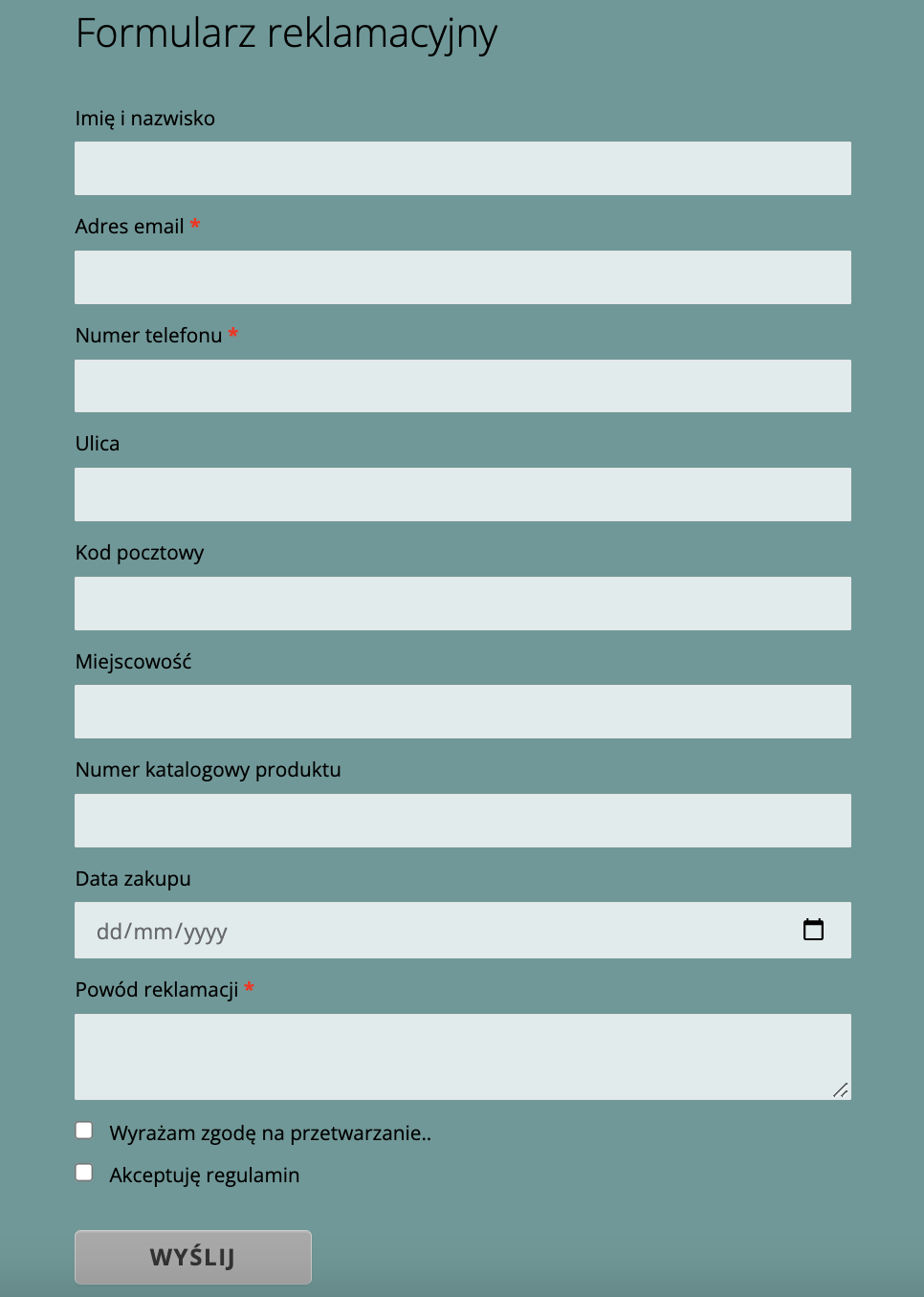
Aby umieścić taki formularz na stronie, należy:
- wejść w zakładkę Formularze z głównego menu i kliknąć przycisk "+Dodaj" w prawym górnym rogu
- wybrać z szablonów "prosty formularz kontaktowy"
- w sekcji "Wybierz typy pól" można dodać dodatkowe pola do formularza
- rozwinąć "Więcej opcji" i w polu "Zmiana wyglądu/działania (własny CSS lub Javascript przed formatką)" wkleić poniższy kod (po kliknięciu w pole kodu, pojawi się suwak do scrollowania)
body {

  /* text */

  --dark-text: #000;

  --medium-dark-text: #000;

  --medium-text: #000;

  --light-text: #000;


  /* backgrounds/tła */

  --light-background: #e0ebeb;

  --errors-background: #fff6f6;

  --form-background: #669999;


  /* borders/krawędzie */

  --light-border: #e5e6e7;

  --dark-border: #ddd;

  --errors-border: #ff9292;


  /* button/przycisk */

  --button-text: #333;

  --button-background: #A9A9A9;

  --button-background-hover: #fff;

}


.gray-bg #form_result_attachments, .gray-bg .btn.btn-link.fileinput-button {

  clear: both;

  display: inline-block;

  float: none;

  margin-bottom: 10px;

  margin-top: 9px;

  width: auto;

}

.gray-bg .appendix_li {

  display: block;

}

.gray-bg .delete_field, .gray-bg .appendix_li>div>span.pull-right {

  color: red;

  float: right;

  font-weight: bold;

}

.gray-bg .lavina_form {

background: var(--form-background) !important;

  text-align: left;

  line-height: 21px;

}

body.gray-bg {

  margin: auto;

  padding: 20px;

  width: 687px;

  overflow: auto;

}

body.gray-bg .lavina_form div.label>div {

  line-height: 20px;

}

body.gray-bg .lavina_form .short-field {

  margin-right: 19px;

}

.label {

  white-space: normal !important;

}

.gray-bg .lavina_form div.label {

  background-color: transparent;

  color: inherit;

  font-family: inherit;

  font-size: inherit;

  font-weight: inherit;

  padding: 0;

  text-shadow: none

}

.gray-bg .lavina_form .s3_uploader+div.text, .gray-bg .lavina_form div.label.small-title label {

  border: 0 none;

  font-size: 14px;

  margin: 0;

}

.gray-bg .lavina_form .short-field {

  float: left;

  width: 34%

}

.gray-bg .lavina_form .short-field input {

  margin-right: 10px;

  min-width: 15px;

  width: 92%!important

}

.gray-bg .lavina_form .short-field:after {

  content: " ";

  display: block;

  clear: both;

  width: 100%;

  float: none

}

.gray-bg .lavina_form .clear-before:before {

  content: " ";

  display: block;

  clear: both;

  width: 100%;

  float: none

}

.s3_uploader+div.text {

  border-top: 1px dashed var(--medium-text);

  color: var(--dark-text);

  display: block;

  font-size: 18px;

  margin: 50px 0 10px;

  padding-bottom: 10px;

  padding-top: 17px;

  text-align: left

}

.lavina_form div.label>div {

  color: var(--light-text);

  font-size: 13px

}

.lavina_form div.label {

  margin: 0

}

.lavina_form div.label>div {

  color: var(--medium-text);

  text-align: left;

}

.lavina_form1 [id^="fieldWithErrors"] select, .lavina_form1 [id^="fieldWithErrors"] textarea, .lavina_form1 [id^="fieldWithErrors"] input {

  background-color: var(--errors-background) !important;

  border: 1px solid var(--errors-border) !important;

}

.lavina_form label {

color: var(--light-text) !important;

  font-weight: 400;

  margin: 0 auto 5px;

}

.lavina_form .form_description {

  display: none;

}

.gray-bg .lavina_form .form_description {

  color: var(--dark-text);

  display: block;

  font-size: 26px;

  font-weight: lighter;

  line-height: 34px;

  margin-bottom: 29px;

  margin-top: 5px;

  display: block;

}

.lavina_form .radio, .lavina_form .checkbox {

  display: inline-block;

  margin-right: 10px!important

}

.lavina_form select, .lavina_form textarea, .lavina_form input[type="text"], .lavina_form input[type="date"] {

  background-color: var(--light-background);

  background-image: none;

  border: 1px solid var(--light-border);

  border-radius: 1px;

  color: inherit;

  display: block;

  font-size: 14px;

  margin-bottom: 10px;

  max-width: 100%;

  min-width: 100%;

  padding: 6px 12px;

  transition: border-color .15s ease-in-out 0s, box-shadow .15s ease-in-out 0;

  width: auto!important

}

#form_result_attachments_container {

  border-bottom: 1px dashed var(--dark-border);

  content: " ";

  display: block;

  margin-bottom: 0 !important;

  padding-bottom: 20px;

  width: 100%;

}

.lavina_form input[type="submit"], .lavina_form input[type="button"] {

  border-image: none;

  border-radius: 4px;

  border-style: solid;

  border-width: 1px;

  box-shadow: 0 1px 0 rgba(255, 255, 255, 0.2) inset, 0 1px 2px rgba(0, 0, 0, 0.05);

  color: var(--button-text) !important;

  cursor: pointer;

  display: inline-block;

  font-size: 15px;

  font-weight: bold;

  height: auto;

  letter-spacing: 1px;

  line-height: 18px;

  margin-bottom: 20px;

  margin-top: 20px;

  padding: 8px 48px;

  text-align: center;

  text-shadow: none;

  text-transform: uppercase;

  vertical-align: middle;

  width: auto;

  background: var(--button-background) !important;

}

.lavina_form input[type="submit"]:hover, .lavina_form input[type="button"]:hover {

  background: var(--button-background-hover) !important;

}

.gray-bg .lavina_form {

  background: var(--light-background) none repeat scroll 0 0;

  line-height: 21px;

  margin-bottom: 100px;

  padding: 50px;

  text-align: left;

}

.lavina_form>form+div {

  text-align: right;

}

.lavina_form>form+div>a {

  color: var(--medium-text);

  display: block;

  padding-top: 11px;

  text-align: right;

}

.lavina_form .radio label, .lavina_form .checkbox label {

  cursor: pointer;

  font-weight: normal;

  margin-bottom: 10px;

  min-height: auto;

  padding: 0px;

}

#form_result_attachments, .btn.btn-link.fileinput-button {

  clear: both;

  display: inline-block;

  float: none;

  margin-bottom: 10px;

  margin-top: 9px;

  width: auto;

}

</style>